Best ROB RUN Settings for FPS and Visibility
Shadows and a hidden 60 FPS cap decide your frame rate in ROB RUN. Our picks for every PC, built on FPS tests.
On this page (8)
Turn Shadows to Disabled for the biggest FPS gain of 11 tested settings: +25, from 87 to 112. Most of the menu barely moves your frame rate, so you can keep the picture sharp. First, though, undo the hidden 60 FPS cap that the presets set.
- Shadows Disabled, FPS
- 87 → 112
- FPS cap after a preset
- 60
- Mouse polling rate to try first
- 1000 Hz
Every FPS test here ran on one PC: RTX 2080 Super, i7-9700K, 1080p, Early Access 0.7.0. Each test used one spot, so your numbers will differ.
Why does ROB RUN stay at 60 FPS?
Because every preset in the test turns VSync on, which syncs frames to your monitor. Untick it and Frame Rate shows 60, so the cap stays until you change that too.
In a test on Ultra, that meant exactly 60 FPS. With the cap removed, the same spot ran at 93. Fix it in four steps:
Press Esc, open Settings, then the Graphics tab.
Go to In game
Pick a Graphics Quality preset as your base.
Go to Graphics > General
Untick VSync.
Go to Graphics > General
Set Frame Rate to Unlimited or your monitor's refresh rate, then press Confirm.
Go to Graphics > General
The preset name then flips to Custom. That's normal: your preset values stay.
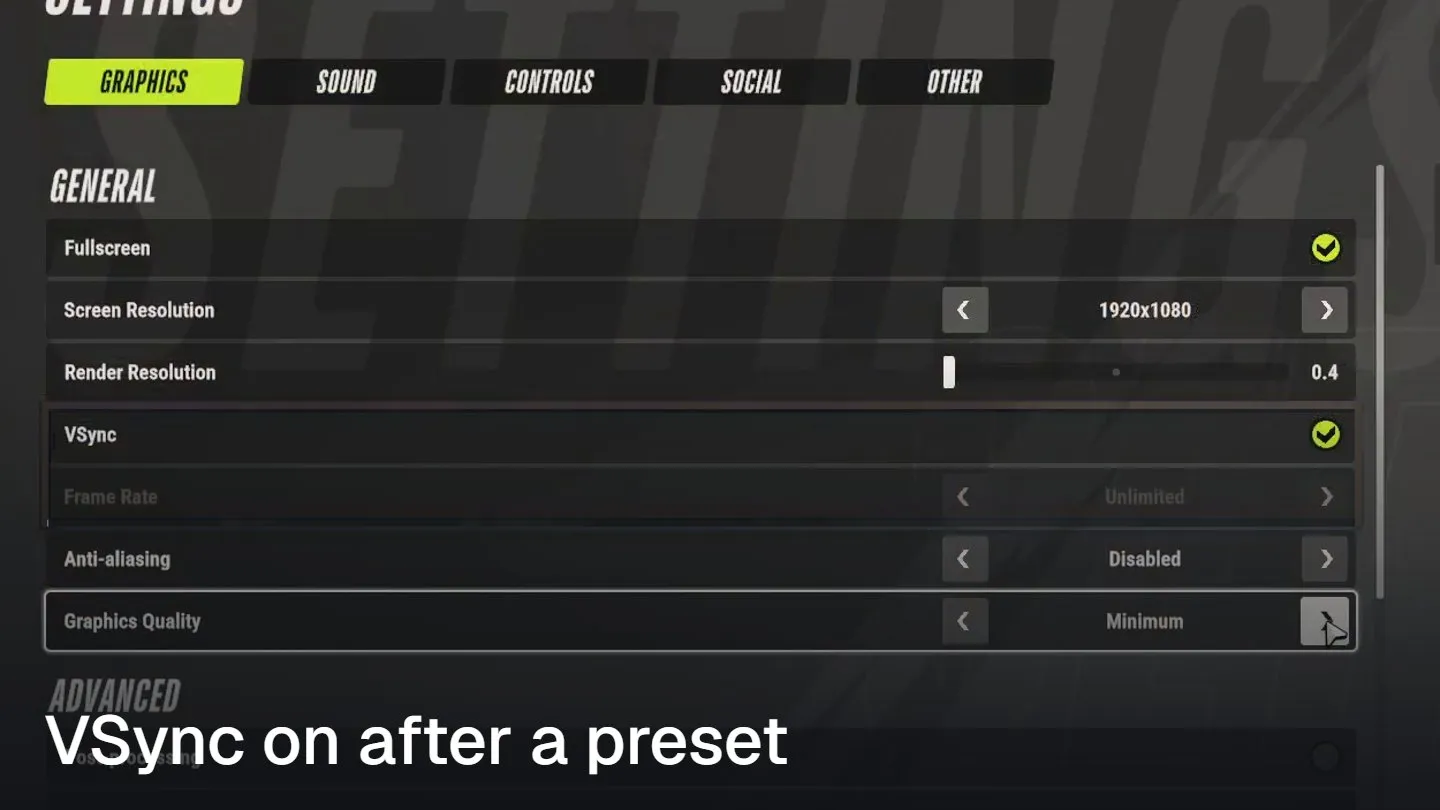
That's the trap: VSync is ticked, so Frame Rate goes grey. It reads Unlimited, but untick VSync and it shows 60.
Which ROB RUN settings cost the most FPS?
Shadows and Additional Light. One test changed 11 settings one at a time on Ultra, at 1080p, inside the prison:
| Shadows Disabled | 112 |
|---|---|
| Additional Light off | 104 |
| Level of Detail 0.4 | 95 |
| Post-processing off | 92 |
| Anti-aliasing off | 88 |
| Ultra, no change | 87 |
Shadows Disabled is highlighted because it's the biggest single gain, +25 FPS. Turning off Additional Light (extra light sources) adds 17 on its own. Turn both off and you still get 112, so the second adds nothing on top.
Gaps of 5 FPS or less are test noise. Only Shadows, Additional Light and Level of Detail clearly help.
Shadows on Minimum Quality gave 86 FPS, no gain over Ultra. Only Disabled adds frames.
The rest stayed within 2 FPS of Ultra, or even lost a few:
| Setting changed | FPS (Ultra = 87) |
|---|---|
| Anti-aliasing SMAA | 88 |
| Environment Reflections off | 88 |
| HBAO off | 87 |
| Texture Quality Low | 85 |
| Object Visibility Distance Low | 81 |
So keep textures, anti-aliasing and view distance up. On this PC they cost close to nothing.
Why don't lower settings raise FPS more?
On many PCs, ROB RUN is held back by the CPU, not the graphics card. Then the graphics menu can't help much.
A Ryzen 5 5600X with an RX 6800 runs at 60-65 FPS near other players. Low to Ultra changes only 5-10 FPS there, with the graphics card at about 40% load. On the test PC, presets still moved FPS from 93 to 121.
FPS also falls in crowded fights, to about 50, and inside buildings. If your graphics card isn't near full load (Task Manager > Performance > GPU), a faster CPU is the fix.
If the card sits at full load, an overclock adds a few frames. Our GPU overclocking guide got about 6% more FPS on an RTX 3080 in Heaven, for 51 W more power.
How do you fix FPS drops when you move the mouse?
Lower your mouse's polling rate, how many times per second it reports to the PC. A too-high polling rate is the official cause of FPS dropping to single digits as you turn (Kefir support).
It looks like this: 100 FPS standing still, 14-20 FPS the moment you turn. Change it in your mouse's own app:
Open your mouse app: Logitech G HUB, Razer Synapse or your brand's.
Go to Windows
Find Polling Rate or Report Rate on the profile you play with.
Go to Mouse app
Set it to 1000 Hz if it's higher.
Go to Mouse app
Still stuttering? Try 500 Hz.
Go to Mouse app
Turn on the FPS counter: set Display performance metrics to show FPS.
Go to Settings > Other
Turn the camera fast in game and watch the FPS counter.
Go to ROB RUN
Going from 4000 Hz to 500, or from 8000 Hz to 1000, usually clears it.
Still stuttering at 500 Hz? Update your graphics driver and close the Discord or GeForce Experience overlay. On an Intel 13th or 14th Gen CPU, also update your BIOS.
What are the best ROB RUN settings for your PC?
Pick your column by graphics card. Low-end matches ROB RUN's minimum spec, mid-range its recommended spec. These are our picks, not measured on each card:
| Setting | Low-end (GTX 1050 Ti, RX 580) | Mid-range (RTX 2070, RX 5700 XT) | High-end (RTX 4070 and up) |
|---|---|---|---|
| Graphics Quality (base) | Low | Medium | High |
| VSync | Off | Off | Off |
| Frame Rate | Unlimited | Monitor refresh rate | Monitor refresh rate |
| Render Resolution | 0.8 | 1.0 | 1.0 |
| Anti-aliasing | Disabled | SMAA | MSAA x4 SMAA |
| Shadows | Disabled | Disabled | Ultra |
| Additional Light | Off | Off | On |
| Motion Blur, Depth of Field | Off | Off | Off |
| Level of Detail | 0.8 | 1.0 | 2.0 |
| Texture Quality | Medium | High | High |
| Object Visibility Distance | Maximum | Maximum | Maximum |
| Water, Grass, Grass Draw Distance | Lowest | Low | Your pick |
Here's the reason behind each choice:
- Weak graphics card: lower Render Resolution. The game draws fewer pixels and scales them up to your screen. Stop at 0.8: the Minimum preset drops it to 0.4 and the picture turns to mush.
- Shadows on mid-range: Minimum Quality adds nothing, only Disabled does. Lose the soft lighting, gain about 25 FPS in the test.
- High-end PC above your refresh rate: keep Shadows and Additional Light on. Extra frames past your monitor's limit don't show.
- Motion Blur and Depth of Field: one smears the picture as you turn, the other blurs anything out of focus. A runner crossing the street gets harder to see, so both are off in every column.
- Anti-aliasing and textures on low-end: they cost only 1-2 FPS on the test PC. We cut them on a weak card as a safety margin, so turn them back up if your FPS holds.
- Water and grass: there are no FPS numbers for them yet. On a weak card, they're the next thing to cut after shadows.
A second test, inside a house with VSync off, ran each preset:
| Ultra | 93 |
|---|---|
| High | 96 |
| Medium | 112 |
| Low | 121 |
| Minimum Render Resolution 0.4 | 139 |
Low is highlighted as the fastest preset short of Minimum: 121 FPS, 28 more than Ultra. Minimum reaches 139, but it drops Render Resolution to 0.4 and blurs everything.
The 0.7.0 menu has no DLSS or FSR, so Render Resolution is the only way to render fewer pixels.
Which settings help you spot players and cops?
Five settings put more on your screen.
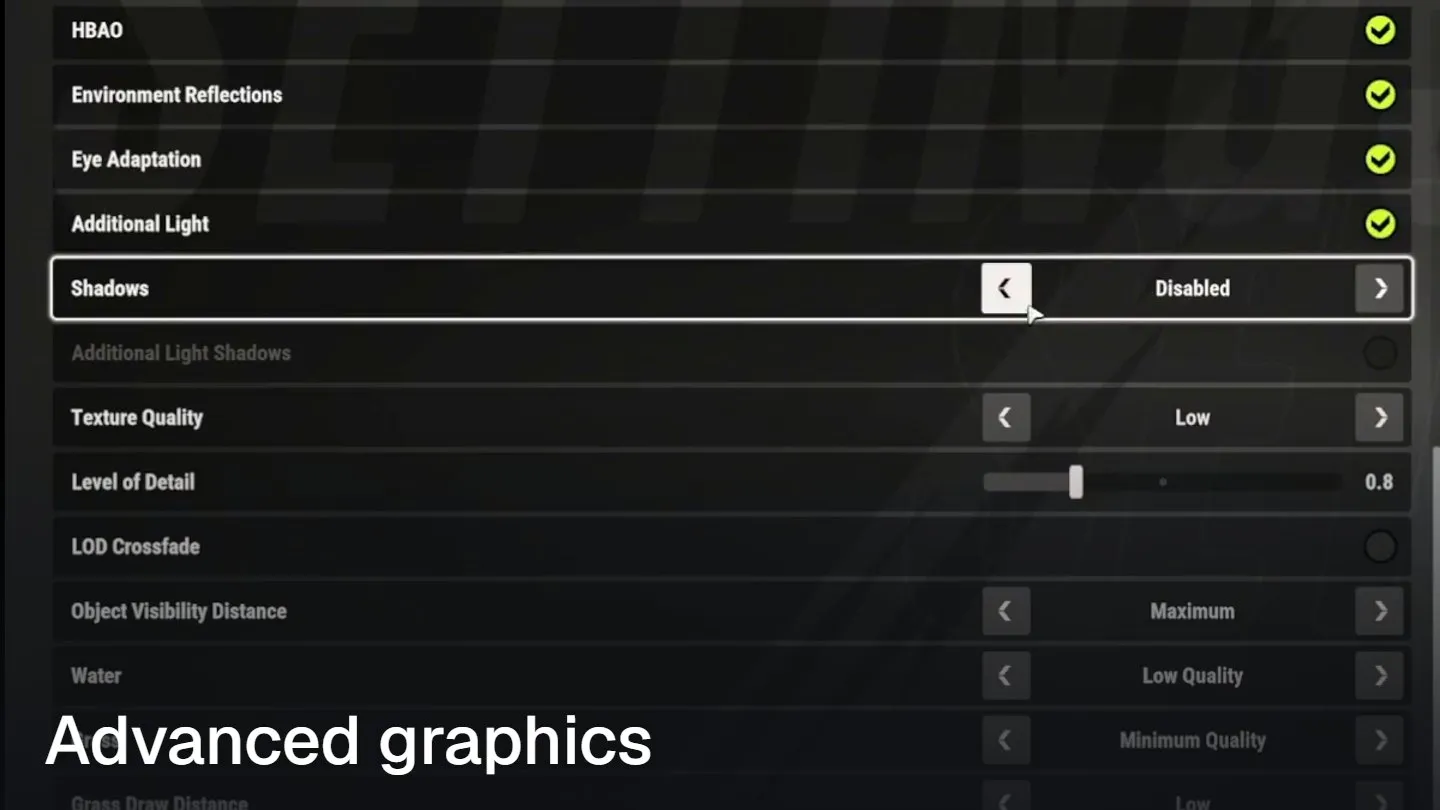
Four help you see or hear trouble sooner, and one tells lag from low FPS:
- Car far down the road: set Object Visibility Distance to Maximum under Graphics. Distant cars and objects stay drawn, and Low gained no FPS in the test.
- Gunfire behind a wall: turn on Sound Effect Visualization under Sound. Gunshots, cars and sirens show up as markers on screen.
- Shooting from a car: turn on Center-of-screen Marker While in Vehicle under Controls. A marker stays in the center while you drive.
- Stepping out of a dark room: turn off Eye Adaptation under Graphics. The screen won't flash bright at the door.
- FPS drop or lag spike? Under Other, set Display performance metrics to show FPS, PING and LOSS (lost packets). Low FPS is your PC, high ping is the connection.
High ping from Asia or Oceania can't be fixed in settings. ROB RUN has only Europe and North America servers, and new regions won't open before the end of 2026.
Pick the region with the lower ping under Settings > Other > Region. You can only switch in prison.
Keep Sound Effects loud and In-game Music low, so a siren never hides under a song. Our cop guide covers what to do once you've spotted them.
What mouse and controller settings does ROB RUN have?
ROB RUN has two mouse sliders, General Sensitivity and ADS Sensitivity, the second for aiming down sights. Both sit under Controls.
Below them you can switch Hold to Aim, Hold to Sprint and Hold to Crouch between hold and toggle. There's no option to invert the mouse Y axis yet.
A controller works through Steam Input. The game is built for mouse and keyboard, and aiming on a pad is hard.
Stuck on a loading screen rather than low FPS? That's a different problem, covered in our Compiling Shaders fix.
So undo the 60 FPS cap first, then kill shadows, and leave the rest sharp.
FAQ
Does ROB RUN have DLSS?
No. Patch 0.7.0 has no DLSS, FSR or XeSS. The only way to render fewer pixels is the Render Resolution slider.
What are ROB RUN's system requirements?
The minimum is an i5-6600K or Ryzen 5 1600, 12 GB RAM and a GTX 1050 Ti or RX 580. Recommended is an i5-9600K or Ryzen 5 3600, 16 GB RAM and an RTX 2070 or RX 5700 XT. Both need 20 GB of space and Windows 10 64-bit.
More on ROB RUN
ROB RUN Authority and Tattoos: Every Prison Reward
ROB RUN Shipments: What to Unlock First
ROB RUN Roulette and Lottery Tickets
ROB RUN Items You Should Never Sell
Read next
How to Overclock a GPU in MSI Afterburner
How to Undervolt a GPU in MSI Afterburner