How to Undervolt a GPU in MSI Afterburner
Undervolt a GPU in the MSI Afterburner curve editor step by step. On our RTX 3080: the same 190 FPS in Heaven at 288 W instead of 316 W.
On this page (4)
You undervolt in MSI Afterburner's curve editor by lifting one voltage point to your clock. On our RTX 3080 that kept 190 FPS in Heaven and cut power from 316 W to 288 W. Everything above that point runs flat, and only hours in your own games prove it holds.
- RTX 3080 avg power in Heaven, W
- 316 → 288
- FPS after, 190.6 at stock
- 190.2
- Daily voltage at 1860 MHz
- 900 mV
Every undervolt number comes from one PC: RTX 3080 Founders Edition (NVIDIA's own model), Ryzen 7 5800X3D, NVIDIA driver 621.01. The test is Unigine Heaven, a free GPU benchmark, at 1080p windowed, DirectX 11, Ultra, Extreme tessellation, 8x AA.
We measured on Nov 14, 2026. Your chip will land somewhere else, so treat our values as a starting point.
What does undervolting a GPU do?
It feeds the GPU less voltage for the same clock. Less voltage means less power and heat at about the same speed.
Your card picks its clock from a voltage/frequency curve: a list of points where each voltage gets a clock. Voltage is counted in mV (millivolts): 900 mV is 0.9 V.
At stock, our card climbed that curve until it hit the power limit, the wattage cap the card won't cross. It sat on that cap 99% of the stock run.
Same benchmark, run back to back on our RTX 3080:
| Setting | FPS | Average power | Peak power | Clock | GPU temp, max |
|---|---|---|---|---|---|
| Stock | 190.6 | 316 W | 320 W | 1770 to 1890 MHz | 80 °C |
| 1860 MHz @ 900 mV | 190.2 | 288 W | 308 W | 1830 to 1845 MHz | 78 °C |
That's 28 W less, about 9%, for 0.4 FPS. The 0.4 is noise: repeat runs on the same settings moved by more than that.
At stock the clock bounced between 1770 and 1890 MHz as the card hit its power cap. Undervolted, it held 1830 to 1845 MHz and never touched the cap.
We ran both settings again later that day, in the session for our overclocking guide. That session read higher FPS on both: 199.3 at stock and 198.8 undervolted. The undervolt ran warmer there and saved 18 W (317 W to 299 W).
So compare numbers inside one session, not across our two guides.
Want more frames instead? That's overclocking, and our GPU overclocking guide shows what it gets on the same RTX 3080.
How do you undervolt a GPU in MSI Afterburner?
You lower the whole curve, raise one point to your target clock, and apply. Afterburner then flattens every point above that voltage.
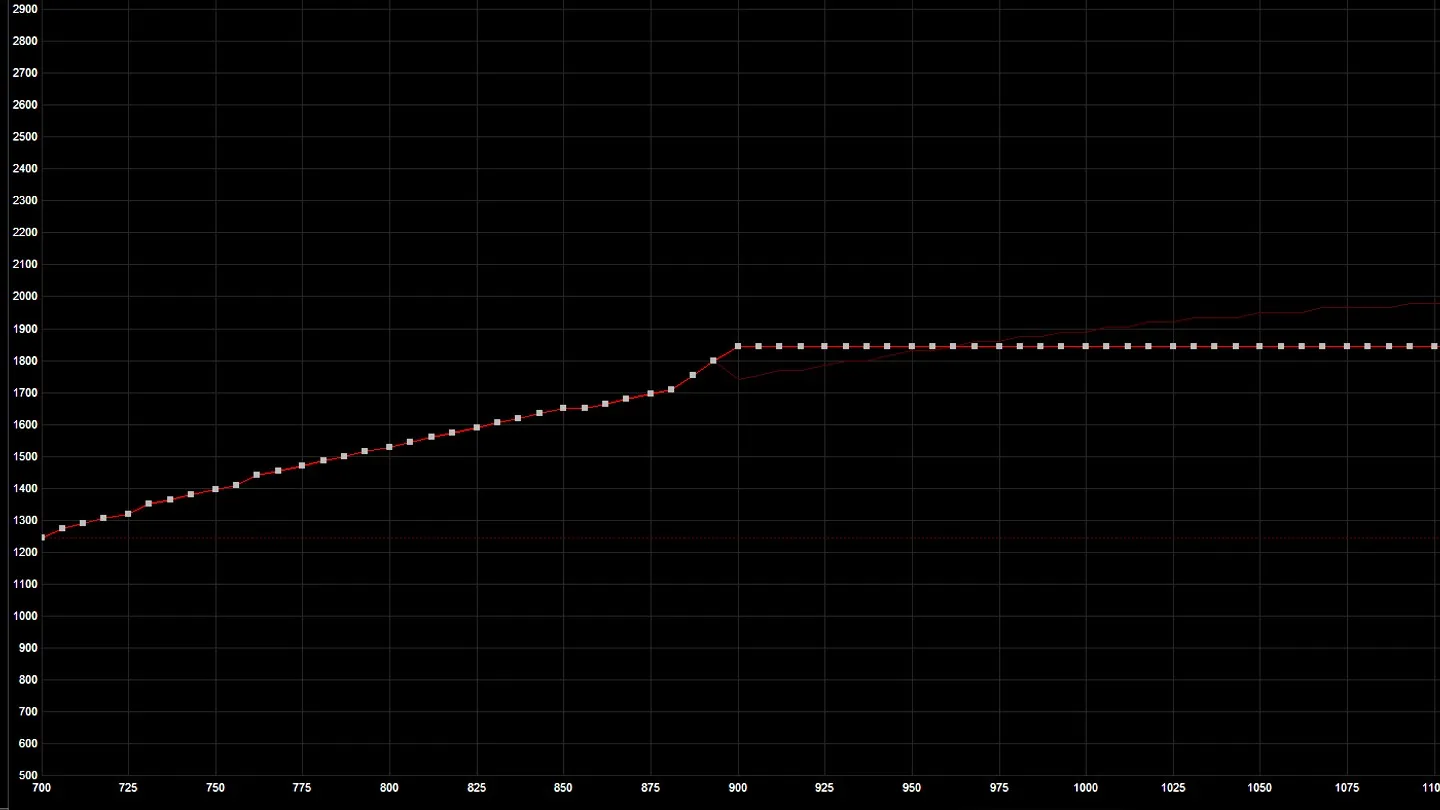
Up is clock in MHz, across is voltage in mV. The thin line is the stock curve.
Pick a clock your card already holds at stock, then find the lowest voltage for it. These steps use Afterburner 4.6.6 on Windows:
Run Heaven at stock and watch the core clock graph. Pick a clock the card holds for most of the run.
Go to Afterburner hardware monitor
Press Ctrl+F to open the Voltage/Frequency curve editor.
Go to Afterburner main window
Hold Shift and drag any point down until every point from 900 mV up sits at or below 1860 MHz. On our card that took -150 MHz, because the stock curve tops out at 2010 MHz.
Go to Curve editor
Click the 900 mV point and press Up until it reads 1860 MHz.
Go to Curve editor
Leave Power Limit at 100% and click Apply (the check mark). The curve turns flat after 900 mV.
Go to Afterburner main window
Click Save, then click profile slot 1 while it flashes.
Go to Afterburner main window
Click the Startup button once your games run for hours with no crash.
Go to Afterburner main window
Ours held 1770 to 1890 MHz at stock, so we took 1860 MHz. Don't panic if the flat line later reads 1845. The driver shifts the curve with temperature, and your shift stays the same.
How do you know your undervolt is stable?
Your undervolt is stable when hours of your heaviest games bring no driver reset. A benchmark pass isn't enough: our card passed Heaven at 862.5 mV and still crashed in Call of Duty.
Watch for these three signs of a crash:
- Screen flickers or goes black for a moment: Windows restarted the driver after a 2-second hang. The game may close.
- "Display driver stopped responding and has recovered": the same reset, with the message Windows shows after it.
- A game closes with no message: open Event Viewer from the Start search, then Windows Logs > System. Look for nvlddmkm errors (that's NVIDIA's display driver).
Any of these means the voltage is too low for that clock. Step up 12.5 mV and test again:
Press Ctrl+D to reset the curve, then shift it down again as before.
Go to Curve editor
Click the point 12.5 mV higher (two points right of 900 mV on our RTX 3080) and press Up until it reads 1860 MHz.
Go to Curve editor
Click Apply, then Save to slot 1.
Go to Afterburner main window
Play the same game for 2 hours or more, then check Event Viewer again.
Go to Your game, then Event Viewer
No new nvlddmkm errors? Keep that voltage.
Here's how we got to 900 mV at 1860 MHz. Each step up followed a crash:
| Voltage at 1860 MHz | Result |
|---|---|
| 837.5 mV | Crashed in Heaven |
| 862.5 mV | Passed Heaven, crashed in Call of Duty |
| 875 mV | Crashed in Monster Hunter Wilds after 30 minutes |
| 887.5 mV | Crashed in Call of Duty |
| 900 mV | 2 hours of Call of Duty, no crash in that session |
Games needed at least 37.5 mV more than Heaven on this card. So use the benchmark to find the floor, then add margin and test in your heaviest games for hours.
Start at 1860 MHz and 900 mV, then let your games set the voltage.
FAQ
What undervolt should you try on an RTX 3080?
Our Founders Edition runs 1860 MHz at 900 mV with the power limit at 100%. Start there, test for hours in your games, and add 12.5 mV if you see driver resets.
Is undervolting a GPU safe?
The voltage only goes down, and Afterburner keeps its voltage slider locked by default for safety. Too low a setting shows up as a crash. Windows restarts the driver, and the game may close with unsaved progress.
Does undervolting void the warranty?
NVIDIA's graphics card warranty doesn't mention undervolting or overclocking. It excludes problems caused by "abuse, misuse, negligence."
NVIDIA covers Founders Edition cards itself. Cards from MSI, ASUS or Gigabyte go through that maker, so check their terms.
Can you undervolt an AMD GPU?
Yes, in AMD Software: Adrenalin Edition. AMD offers it only on select GPUs. To find it:
Search Tuning in AMD Software.
Go to AMD Software
Open Performance Tuning.
Go to AMD Software
Pick Undervolt GPU under the GPU's automatic tuning.
Go to Performance Tuning
No Undervolt GPU option means AMD doesn't offer it for your card.
More on PC Guides
How to Overclock a GPU in MSI Afterburner
Read next
ROB RUN Authority and Tattoos: Every Prison Reward

ROB RUN Shipments: What to Unlock First