How Much VRAM Do You Need for Gaming?
8 GB is still the most common VRAM on Steam, and it covers 1080p. 1440p, 4K and ray tracing are where it runs short.
On this page (7)
Get 8 GB of VRAM for 1080p, 12 GB for 1440p on High and 16 GB for 4K Ultra. If your card has 8 GB, every game below still runs on it. Past 1080p, you'll just turn textures down first.
- 1080p
- 8 GB
- 1440p on High
- 12 GB
- 4K on Ultra
- 16 GB
How much VRAM do you need for 1080p, 1440p and 4K?
The higher your resolution, the more VRAM a game asks for: 8 GB at 1080p, 16 GB at 4K. These numbers come from the publishers' own PC specs.
VRAM is your graphics card's own memory. It holds the textures (the images wrapped over every model) and the frame being drawn.
Three big games list a separate spec for each resolution. Here's the VRAM each one asks for:
| Game | 1080p | 1440p | 4K |
|---|---|---|---|
| Battlefield 6 | 6 GB (Low, 30 fps) | 8 GB (High, 60 fps) | 16 GB (Ultra, 60 fps) |
| DOOM: The Dark Ages | 8 GB (Low, 60 fps) | 10 GB (High, 60 fps) | 16 GB (Ultra, 60 fps) |
| Indiana Jones and the Great Circle | 8 GB (Low, 60 fps) | 12 GB (High, 60 fps) | 16 GB (Ultra) |
Every 4K spec here asks for 16 GB. At 1440p the asks run from 8 to 12 GB, so a 12 GB card covers all three.
Most players sit in the first column. In Steam's October survey, 52% of PCs ran 1080p, 22% ran 1440p and only 5% ran 4K.
Is 8 GB of VRAM still enough?
Yes for 1080p. 8 GB isn't dead: every game below starts on 8 GB or less, and most recommend exactly 8 GB.
It's also the most common amount. 33.9% of Windows PCs on Steam had exactly 8 GB in October, more than any other size.
Each game's recommended card, by VRAM. Where a spec lists several cards, we count the Nvidia one:
| ARC Raiders min 4 GB | 8GB |
|---|---|
| ROB RUN min 4 GB | 8GB |
| WARDOGS min 6 GB | 8GB |
| Battlefield 6 min 6 GB | 8GB |
| HUNGER min 8 GB | 8GB |
| DOOM: The Dark Ages min 8 GB | 10GB |
| Escape from Tarkov min 6 GB | 12GB |
| Indiana Jones min 8 GB | 12GB |
The lime bars are the games that ask for more than 8 GB. Targets differ by game: HUNGER's specs aim at 1080p Medium, Indiana Jones' at 1440p High.
In ROB RUN, textures barely cost fps, so our best settings keep them high while your VRAM has room.
8 GB runs short in three places:
- 1440p on High in a newer game: DOOM wants 10 GB and Indiana Jones 12 GB. On 8 GB, drop textures one step.
- Full ray tracing (path tracing): Indiana Jones' full ray tracing needs at least 12 GB on Nvidia cards. An 8 GB card can't turn it on.
- 4K: every official 4K spec above asks for 16 GB.
Our own RTX 3080 has 10 GB. It meets DOOM's 1440p spec exactly and falls 2 GB short of Indiana Jones'.
What happens when you run out of VRAM?
The game spills into your PC's regular RAM, and the card slows down waiting for it. Task Manager calls that borrowed RAM Shared GPU memory.
Windows lets the card borrow up to half your RAM: 8 GB on a 16 GB PC. Textures pulled from there can hit your frame rate hard.
Three signs point to full VRAM, each with its fix:
- Hitches when you turn or reach a new area: the card is swapping textures in and out. Lower Texture Quality one step.
- Blurry textures that load late or never sharpen: some games swap in smaller versions to fit instead of stuttering. Same fix, textures down a step.
- A crash with a video memory error: your settings ask for more than the card has. Lower them before you reinstall anything.
Indiana Jones' "Failed to allocate video memory" error is one example. Its Safe Mode launch starts on the lowest settings so you can fix them.
How do you check how much VRAM you have and use?
Task Manager shows both in a few clicks. MSI Afterburner shows the number on screen while you play.
In Windows 10 or 11:
Press Ctrl + Shift + Esc to open Task Manager.
Go to Windows
Open the Performance tab.
Go to Task Manager
Click your graphics card. It's GPU 0 or GPU 1, with the card's name under it.
Go to Performance, left list
Read Dedicated GPU memory. The second number is your VRAM, the first is what's in use.
Go to Performance > GPU
Play for a few minutes, then check both numbers again.
Go to Your game, then Task Manager
Shared GPU memory sits right under Dedicated. If it climbs a lot while you play, your VRAM is likely full.
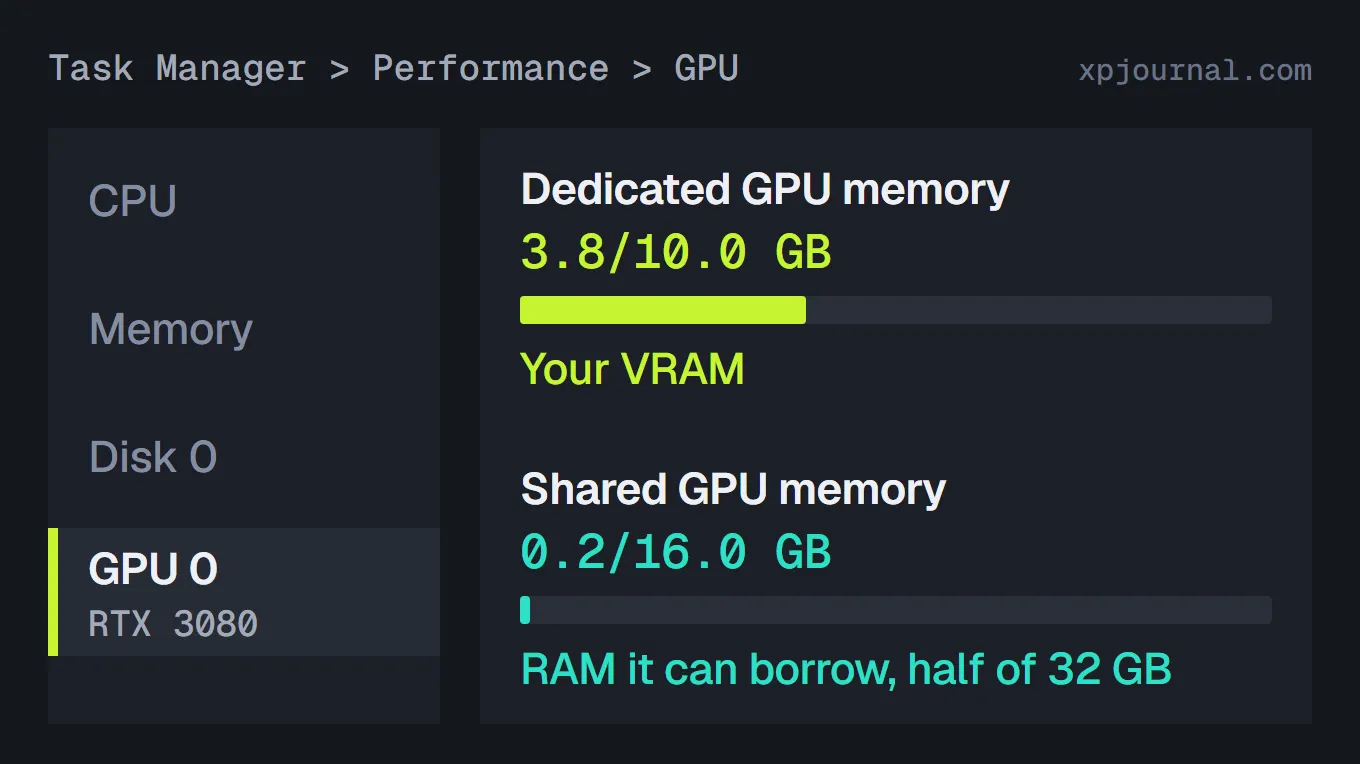
This schematic uses real readings from our RTX 3080: 3.8 GB in use out of 10.0 GB.
For a live number in game, use MSI Afterburner, the free tool from our undervolt guide:
Install RivaTuner Statistics Server too. Afterburner needs it to draw the overlay.
Go to Windows
Open Settings, then the Monitoring tab.
Go to Afterburner
Click Memory usage and tick Show in On-Screen Display.
Go to Settings > Monitoring
Do the same for Memory usage \ process, the game's own share.
Go to Settings > Monitoring
Click Apply and start your game.
Go to Settings
Watch Memory usage while you play. If it sits at your card's total and the game stutters, your VRAM is full.
Which settings use the most VRAM?
Texture Quality is usually the biggest one you control. Resolution, ray tracing and frame generation cost memory too.
Each one costs memory in its own way:
- Texture Quality on Ultra: in some games the top step just raises the memory budget. High often looks close and uses less.
- A higher resolution: every step up costs memory. DOOM's specs climb from 8 to 10 to 16 GB from 1080p Low to 4K Ultra.
- Ray tracing: it keeps extra scene data in VRAM. In Indiana Jones, the jungle plants alone needed 1,027 MB of it, cut to 606 MB later.
- Frame generation: its AI model needs memory too. Nvidia's newer model uses 30% less, about 400 MB less at 4K in Warhammer 40,000: Darktide.
Turn textures down one step before you touch the rest. It usually frees the most memory.
Should you buy an 8 GB, 12 GB or 16 GB graphics card?
Buy for your monitor and for how long you'll keep the card:
- Playing at 1080p? 8 GB works. Every game in our chart starts on 8 GB or less.
- 1440p, or you keep a card for years? Get 12 GB. It covers every 1440p spec above and Indiana Jones' full ray tracing.
- 4K, or max textures everywhere? Get 16 GB. Every official 4K spec above asks for it.
Two cards come in both sizes, 8 GB and 16 GB: the RTX 5060 Ti and the RX 9060 XT. At launch the 16 GB versions cost $50 more.
It's the same chip either way, so that $50 buys only memory. Take the 16 GB version if you can.
The main desktop cards on sale now, sorted by memory:
| VRAM | Nvidia | AMD | Intel |
|---|---|---|---|
| 8 GB | RTX 5050, RTX 5060, RTX 5060 Ti 8 GB | RX 9060 XT 8 GB | None |
| 10 GB | None | None | Arc B570 |
| 12 GB | RTX 5070 | RX 9070 GRE | Arc B580 |
| 16 GB | RTX 5060 Ti 16 GB, RTX 5070 Ti, RTX 5080 | RX 9060 XT 16 GB, RX 9070, RX 9070 XT | None |
| 32 GB | RTX 5090 | None | None |
Size the memory to your monitor, and drop textures first when it runs short.
FAQ
Is 16 GB of VRAM overkill?
Not for 4K: every official 4K spec above asks for 16 GB. At 1080p, no game here asks for more than 8 GB.
Can an 8 GB RTX 5060 handle 1440p?
Its 8 GB matches Battlefield 6's 1440p High spec. DOOM and Indiana Jones ask for 10 and 12 GB there, so lower textures in those.
Can you add more VRAM to a graphics card?
No. VRAM is built onto the card, so the amount is fixed. Overclocking the memory raises its speed, not its size, as in our overclock guide.
How much VRAM will GTA 6 need on PC?
Nobody knows yet. Rockstar hasn't announced a PC version, so there are no PC specs.
GTA 5 Enhanced recommends an 8 GB card. Our GTA 6 PC requirements guide estimates the other parts a PC version may need.
Read this next
HUNGER System Requirements: Can Your PC or Steam Deck Run It?
See where your card lands for HUNGER
Read the guideNew PC guides, straight to your inbox
Unsubscribe anytime. See our Privacy Policy.
More on PC Guides
How to Undervolt a GPU in MSI Afterburner
How to Overclock a GPU in MSI Afterburner
GTA 6 PC Requirements: Will Your PC Run It?
Read next
How to Play HUNGER With Friends or Solo
Probably Stolen Vending Machine Purifier Setup