HUNGER System Requirements: Can Your PC or Steam Deck Run It?
HUNGER needs a GTX 1080 and 16 GB of RAM for 1080p Low at 30 fps, or an RTX 3060 Ti and 32 GB for Medium at 60 fps. Where your GPU lands, plus Steam Deck.
On this page (5)
A Windows PC with a GTX 1080 or faster runs HUNGER, but a Steam Deck can't join matches. You can test your own PC free in the Open Beta, November 27–29, before Early Access opens on December 3. An RTX 3060 or RTX 4060 clears the minimum but not the recommended card.
- Minimum graphics card
- GTX 1080
- Minimum RAM, 32 GB recommended
- 16 GB
- Free space Steam asks for
- 40 GB
What are HUNGER's minimum and recommended specs?
The minimum PC runs HUNGER at 1080p on Low at 30 fps. The recommended PC gets 1080p on Medium at 60 fps or more.
Both need Windows and DirectX 12, the graphics layer that Windows 10 and 11 already include. Here are the specs from the Steam page:
| Part | Minimum | Recommended |
|---|---|---|
| Target | 1080p Low, 30 fps | 1080p Medium, 60+ fps |
| OS | Windows 10 | Windows 11 |
| CPU | Intel Core i7-6700K or AMD Ryzen 5 3600 | Intel Core i5-11600K or AMD Ryzen 7 5700X |
| RAM | 16 GB | 32 GB |
| Graphics card | Nvidia GTX 1080 or AMD RX 5700 | Nvidia RTX 3060 Ti or AMD RX 6700 XT |
| Storage | 40 GB | 40 GB |
There are no official specs for High settings, 1440p or 4K yet. Good Fun Corporation planned a cautious minimum, so nobody buys the game expecting more than a weak PC can give.
Most gaming PCs fall short of the recommended 32 GB of RAM. In Steam's October survey, 41% of PCs had 16 GB and about 56% had less than 32 GB.
8 GB is below the minimum. In one Closed Beta test, a 16 GB PC already had about 13 GB in use with the game running.
Keep 40 GB free on your drive. The beta download is smaller, about 20 GB, but Steam still asks for the full 40 GB.
Will my graphics card run HUNGER?
It will if your card matches a GTX 1080 or beats it. A newer card isn't always faster: an RTX 3050 is about 21% slower, so it sits below the minimum.
Here's how Steam's most common cards compare in general speed at 1080p, with the GTX 1080 as 100:
| GTX 1650 | 52% |
|---|---|
| RTX 3050 | 79% |
| GTX 1080 minimum | 100% |
| RTX 3060 | 129% |
| RTX 4060 | 150% |
| RTX 3060 Ti recommended | 167% |
| RTX 5060 | 185% |
| RTX 5070 | 275% |
The two highlighted bars are the official minimum and recommended cards. Your card falls into one of four groups:
- GTX 1650, GTX 1650 Super, RTX 3050 or GTX 1660 Super: you're short at 52%, 70%, 79% and 84%. In one Closed Beta test, a GTX 1650 Super ran at about 40 to 47 fps on 1080p Low. Try the beta before you buy.
- RX 6600, RTX 3060 or RTX 4060: you clear the minimum at 114%, 129% and 150%. You still miss the recommended card at 167%, so start on Low and raise one setting at a time.
- RTX 3060 Ti, RX 6700 XT or faster: you're in the recommended tier, 1080p Medium at 60 fps. An RTX 5060 scores 185% and an RTX 5070 scores 275%.
- Gaming laptop with an RTX 4050, 3060, 4060 or 5060: you clear the minimum on paper, at 102% to 127%. None of these laptop chips reaches the RTX 3060 Ti, so expect results between the two Steam targets.
These are general speed scores, not HUNGER benchmarks. Dense forests cost the most frames, so judge your PC there.
Close to the line? An overclock won't bridge a big gap: our MSI Afterburner overclock gained about 6%.
For the processor, compare model to model. The minimum Intel chip, the i7-6700K, has 4 cores, and the recommended i5-11600K has 6.
The game files include Nvidia DLSS, DLSS Frame Generation and Reflex. AMD's FSR arrived in an August update.
Words to know (3)
- DLSS / FSR
- Upscalers from Nvidia and AMD. The game draws fewer pixels and scales the image up, so you get more fps.
- Frame Generation
- Inserts made-up frames between real ones. Motion looks smoother, but your inputs feel slower.
- Reflex
- Nvidia's setting that cuts the delay between your click and the shot on screen.
One Closed Beta catch: graphics changes often took effect only after a restart. Change your settings, then restart the game.
Can you play HUNGER on Steam Deck, Linux or console?
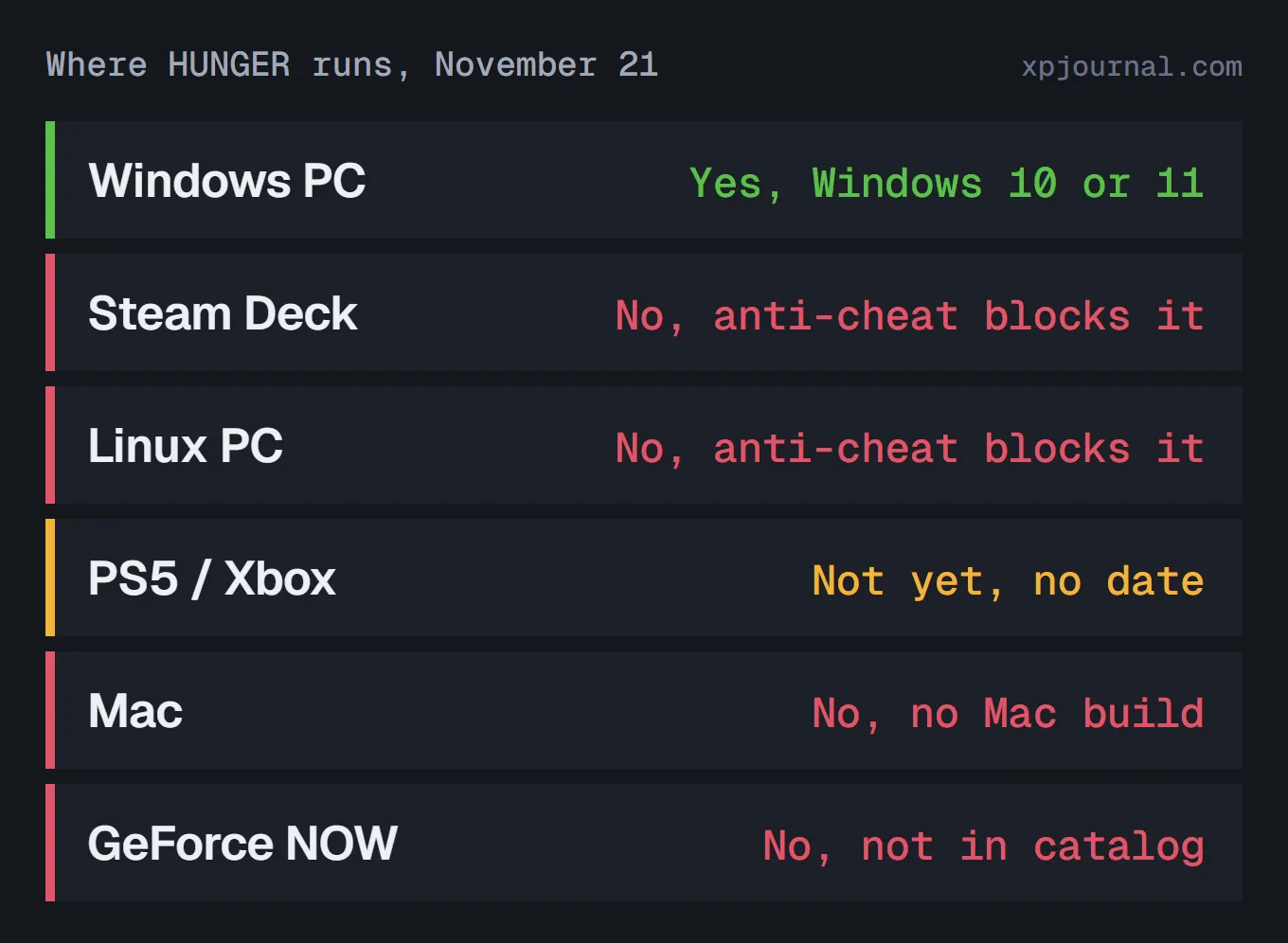
Not on Steam Deck or Linux: online play is blocked there. Consoles come later. There's no Mac version either.
Here's every platform, checked November 21:
Power isn't the problem on the Deck. In one July test build, a Steam Deck OLED ran the tutorial at about 45 fps on Low.
The wall is Easy Anti-Cheat, a kernel-level anti-cheat that runs deep in the system to catch cheaters. In HUNGER it doesn't support Linux, and SteamOS on the Deck is Linux.
The game opens and the tutorial plays. Then entering the Chateau, the online hub, kicks you out with an anti-cheat error.
The same goes for any Linux PC running Proton, Valve's layer that runs Windows games there. ProtonDB, a site that collects Linux reports, rates HUNGER Borked, its lowest rating, from 27 reports.
Steam lists the Deck status as Unknown, so Valve hasn't tested it for its Deck Verified badge. Linux isn't supported right now, and there's no date for it.
If a friend plays on a Deck, they can't join your party yet. Cloud gaming is out too: GeForce NOW doesn't list HUNGER.
Is HUNGER coming to PS5 or Xbox?
Not at launch, and there's no date. In November, the studio moved consoles from after Early Access to during it, with a 60 fps target there.
Early Access starts on PC only, on December 3 at 10:00 GMT. Crossplay between PC and consoles hasn't been announced.
How do you check if your PC can run HUNGER?
Windows has a built-in tool for this, DxDiag. It shows your processor, RAM, DirectX version and graphics card in one place:
Type dxdiag in the search box and open it.
Go to Windows taskbar
Read Processor and Memory under System Information.
Go to System tab
Check that DirectX Version says DirectX 12.
Go to System tab
Open the Display tab and note your graphics card's name.
Go to Display tab
Compare each part with the Minimum column in the table above.
Still close to the line after that? The free Open Beta on November 27–29 is the real test on your own PC.
To get in, request access on Steam before November 27:
Open the HUNGER page.
Go to Steam store
Click Request Access in the Join the Hunger Playtest box.
Go to HUNGER store page
Install the Hunger Playtest when it shows up in your library.
Go to Steam library
The Open Beta is free and runs November 27–29.
So find your card against that GTX 1080 line, then test it free.
FAQ
Will HUNGER run better at launch?
It should keep improving, but nothing promises a jump by December 3. The studio plans more optimization during Early Access and an Unreal Engine update, with no date yet.
Does HUNGER need an SSD?
Steam doesn't list one. It asks for 40 GB of free space and says nothing else about the drive.
Read this next
How to Play HUNGER With Friends or Solo
Party size and how to invite your friends
Read the guideNew HUNGER guides, straight to your inbox
Unsubscribe anytime. See our Privacy Policy.
Read next
Probably Stolen Vending Machine Purifier Setup

ROB RUN Patch Notes, November 20: Friends in the Server List and Cop Slots