Is Aniimo on PS5, Xbox, Switch or Mobile?
Aniimo is free on PS5, Xbox Series X|S, PC, iPhone and Android, but not on Switch. Here's how crossplay works and how to keep one save everywhere.

On this page (9)
Yes: Aniimo is free on PS5, Xbox Series X|S, PC, iPhone and Android, but not on Switch. Link an email and log in with it on every device, or a new device can start a brand-new character.
Is Aniimo on PS5 or Xbox?
Yes, on both, and it costs nothing to download. Aniimo launched on PS5, Xbox Series X|S and PC on September 16, 2026. Phones followed a week later.
Here's every device people ask about:
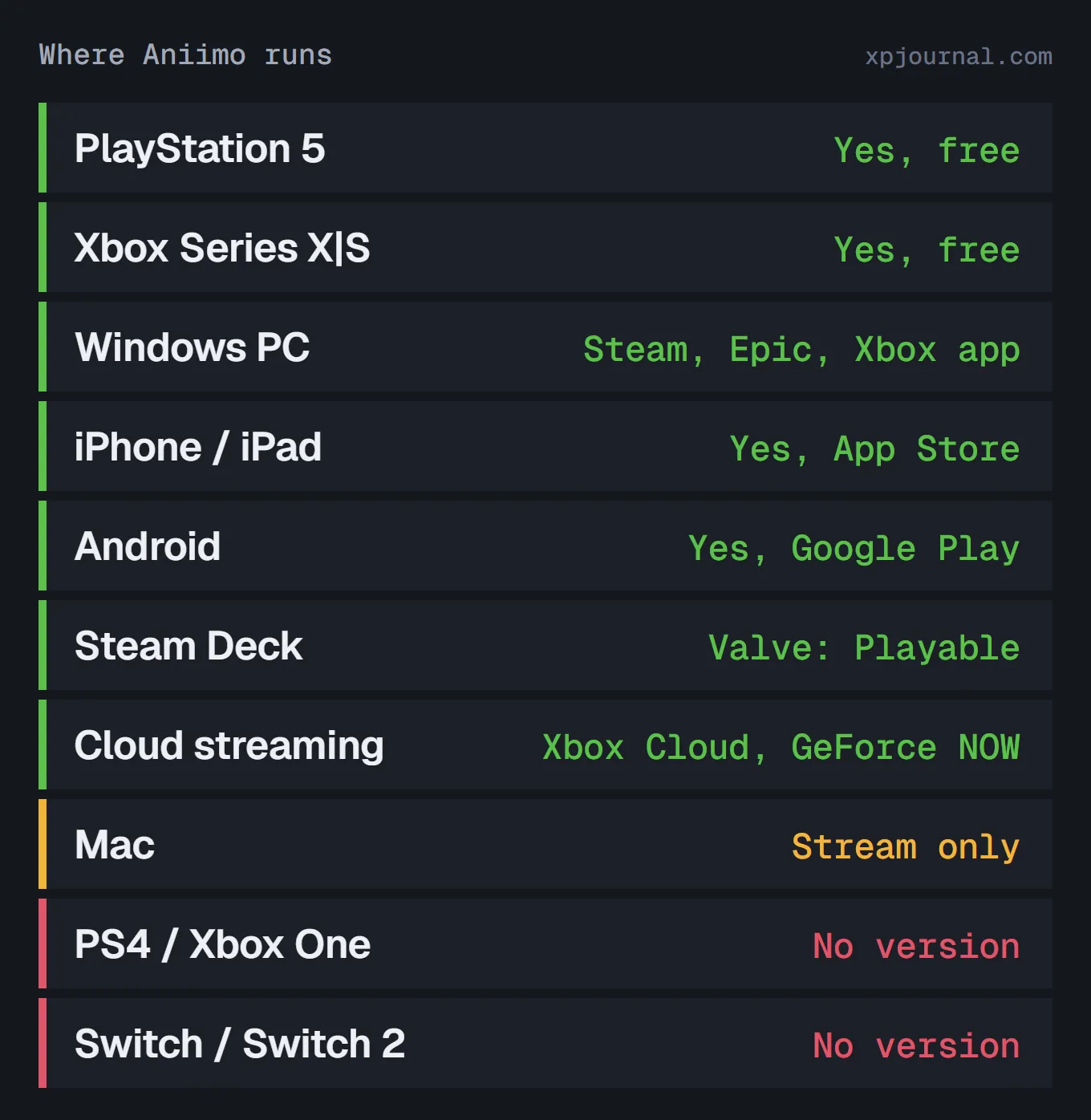
Green means a version you can install or stream today. Amber means streaming only. Red means there's no version at all.
On consoles, here's what to expect:
- You're on PS5: it's free in the PS Store, for PS5 only. Keep 30 to 35 GB free and stay online, because the listing says online play is required.
- You're on Xbox: it runs on Series X|S, not Xbox One. Game Pass Essential, Premium and Ultimate include it, but you don't need Game Pass to play.
The November 12 update fixed friends and mail not showing for some PS5 and Xbox players. It also let PS5 players rejoin a party from an invite after leaving it.
On PC, it's free on Steam, the Epic Games Store, the Xbox app and the official launcher at aniimo.com. You need at least a GTX 970 and 40 GB, ideally on an SSD.
Not sure your graphics card keeps up? Our VRAM guide explains what the numbers mean.
Is Aniimo on Nintendo Switch or Switch 2?
No. Aniimo's site, its Steam posts and FunPlus's press releases list no Switch or Switch 2 version. FunPlus is the company behind the studio, Pawprint.
Searching the US eShop for "aniimo" finds one result: Animo, a $1 add-on for the puzzle game hexceed from 2021. It has nothing to do with Aniimo.
Got a Switch Pro or Switch 2 Pro controller? Both work with Aniimo on PC. On phones, Switch controllers and Joy-Con don't.
Is Aniimo on mobile?
Yes. Aniimo came to iPhone, iPad and Android on September 23, 2026, free in the App Store and Google Play.
Check your phone against the official spec sheet before you download:
| Phone | Minimum | Recommended |
|---|---|---|
| iPhone | iPhone 11 (A13), iOS 16 | iPhone 14 Pro (A16) or newer |
| Android | Snapdragon 855 / Dimensity 1000, 6 GB RAM, Android 10 | Snapdragon 8 Gen 2 / Dimensity 9200, 8 GB RAM |
| Free space | 18 GB | 18 GB |
Below the minimum, Pawprint warns the game may not launch or run properly. Keep spare space after the install too, because updates need room to download and check files.
Android phones also need Vulkan 1.1, a graphics driver standard. Without it, Pawprint warns the game may not install or start.
Prefer buttons? You can pair a PS5 or Xbox controller over Bluetooth, but it won't vibrate on a phone.
How do you spot a fake Aniimo app or APK?
Check the publisher first: the real game comes from Pawprint. An APK is an Android install file from outside Google Play, and the only official one sits on aniimo.com.
That site's Android download button gives you the same build as the App Store. That's version 1.1.1, and it should switch to 1.1.2 with the November 26 update.
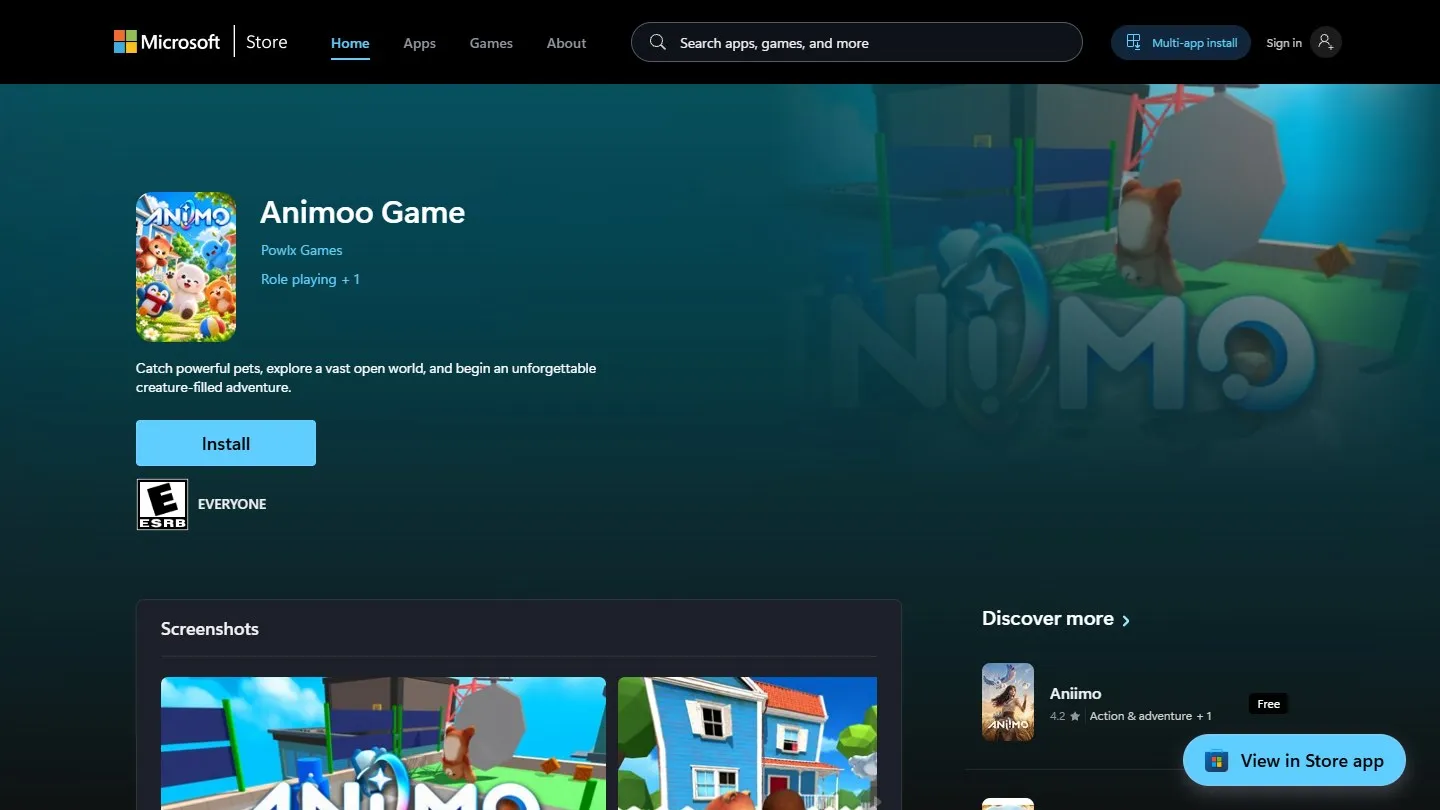
The clearest copycat is in the Microsoft Store: Animoo Game by Powlx Games. Its store text copies Aniimo's own description in places. Here's the listing, with the real Aniimo shown right beside it:
The App Store's Aniimo Companion is something else: an offline reference app from MetaForge, not the game.
Before you install anything called Aniimo, check these signs:
- Publisher isn't Pawprint: it's another company's app. The App Store lists Pawprint Interactive Entertainment, and Google Play lists Pawprint Studio.
- APK from a download site: skip it. Pawprint's own FAQ says to install only from official channels.
- Someone wants a code or payment for rewards: it's a scam. Pawprint says rewards only come through events and in-game mail.
On Android, start in Google Play. Its US search shows only the real Aniimo.
Can you play Aniimo on a Mac or Steam Deck?
Steam Deck, yes. Mac, only by streaming: Steam lists Aniimo for Windows only, and the official site has no Mac download.
Each one works differently:
- You have a Steam Deck: Valve rates Aniimo Playable. It runs well on the default settings, but some text is small and the default controls miss a few actions.
- You have a Mac: stream it with GeForce NOW, NVIDIA's cloud service. Its Mac app needs macOS 10.15 or later. Your Steam copy of Aniimo plays there.
On the Deck, the on-screen keyboard won't open by itself when you need to type.
Can you stream Aniimo from the cloud?
Yes, three ways, and two of them have a free option. In each, the game runs on a remote computer and streams to your screen.
Each service asks for something different:
| Service | What you need |
|---|---|
| GeForce NOW | Free, Performance or Ultimate membership (plays your Steam copy) |
| Xbox Cloud Gaming | Game Pass Essential or higher, or an Xbox account (ads, time limits) |
| PS5 and PS Portal streaming | PS Plus Premium |
GeForce NOW needs at least 15 Mbps for 720p and 25 Mbps for 1080p at 60 FPS. It also needs under 80 ms of lag, and it works best on a cable or 5 GHz Wi-Fi.
Below that, every button press lands late.
Is Aniimo crossplay?
Yes. PC, PS5, Xbox and phone players can play together, as long as everyone picks the same server.
There are three: Aniimo-Americas, Aniimo-Europe and Aniimo-Apac. Each one keeps its own characters, so pick the one your friends use.
Parties hold up to 4 players on PS5 and Xbox, and Egg Heist, the extraction mode, takes teams of 3. Don't want strangers to see your PSN or Xbox name? Version 1.1 added a console setting that hides it.
On PC, you choose the server on the title screen, just above Start Adventure. On PS5, players report the game picks it from your PSN account's region, with no way to change it.
How do you keep one save on PC, PS5 and phone?
Link one email to your Aniimo Pass, then log in with it on the same server everywhere. Aniimo Pass is the game's own account, and the email is how other devices find it.
Progress, resources and your party lineup then sync, including every Sparkling Aniimo you've caught. Do it in this order:
Link an email at the Link Email prompt on your first start.
Go to Link Email prompt
Skipped it? Open Settings > Account > Account Management.
Go to In-game menu (Esc on PC)
Select Link Now next to Email.
Go to Account Management
Enter your email and select Get Code.
Go to Email Verification window
Enter the code you get by email and select Confirm.
Go to Email Verification window
Pick the same server on your next device.
Go to Title screen, above Start Adventure
Log in with that email and load your character.
Go to Login screen
On PS5, players report the server follows your PSN region, so pick that same server on PC and phone.
On Steam or Epic, you can unlink an account yourself in Settings > Account Settings.
So link that email on day one, and join your friends' server.
FAQ
Is Aniimo on Game Pass?
Yes. Xbox lists it in Game Pass Essential, Premium, PC Game Pass and Ultimate, on console, PC and cloud. It's free without Game Pass too.
Is Aniimo on PS4 or Xbox One?
No. The PS Store lists it for PS5 only, and Xbox lists Series X|S, PC, cloud and handhelds.
Can you play Aniimo offline?
No. The PS Store marks online play as required, and Valve notes even solo play needs internet.
Updates (1)
- Update Android build should move to 1.1.2 with the Nov 26 update
Read this next
Aniimo Sparkling, Dazzling, Shadow and Prismana Explained
See how to find Sparkling and Prismana Aniimo
Read the guideNew Aniimo guides, straight to your inbox
Unsubscribe anytime. See our Privacy Policy.
More on Aniimo

Aniimo November 26 Update: Maintenance, Level 50 Whisperwake, Events

Aniimo Egg Heist Guide for Beginners

How to Get Gachapus in Aniimo
Read next
Best Faceless Void Time Dilation Build in Dota 2

Division 2 Expertise 30: Cost, Fastest Route and When to Stop